The whole room feels like one enormous task.
“Sort the room out” gives you no clear starting point or stopping point.
For households with changing days and limited time
Digital files in English.
Choose one zone, one doable action and a finish you can recognize—with Room by Room Reset.
A practical guide, reusable worksheets and an optional offline planner. Make a plan that fits today, then adjust it when the week changes.
See a real page before you chooseOne-time purchase · Digital files
14-day refunds, including after download.
US Letter + A4 · Fillable worksheets · Personal household use
Sound familiar?
“Sort the room out” gives you no clear starting point or stopping point.
A useful routine has to fit around the day you are actually having.
Returning is easier when you can choose a fresh next step.
A shared understanding matters more than another long list.
What becomes easier
Map your home and choose a place where one action would help.
A usable chair or a clear counter is easier to recognize than “tidy up.”
Adjust your estimates and choose which tasks fit today.
Use owner labels and a handoff sheet to support a household conversation.
Shrink, move, skip a cycle or remove a routine when circumstances change.
Print a sheet, fill a saved PDF or keep your working plan in the optional HTML file.
A simple way to work
Start with what would make a space usable. Decide who will do it, estimate the time, and set the next date. The kit gives you a repeatable way to make those decisions without prescribing a single cleaning schedule.
Look inside / An interrupted week
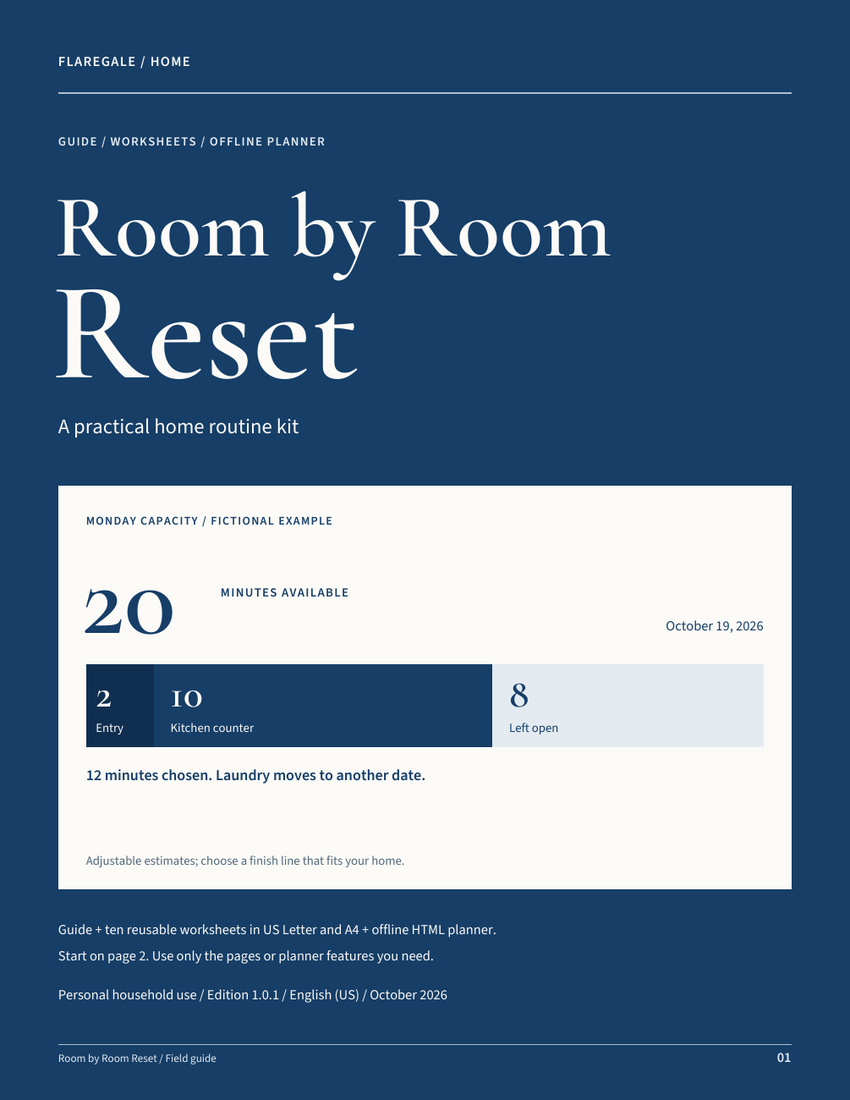
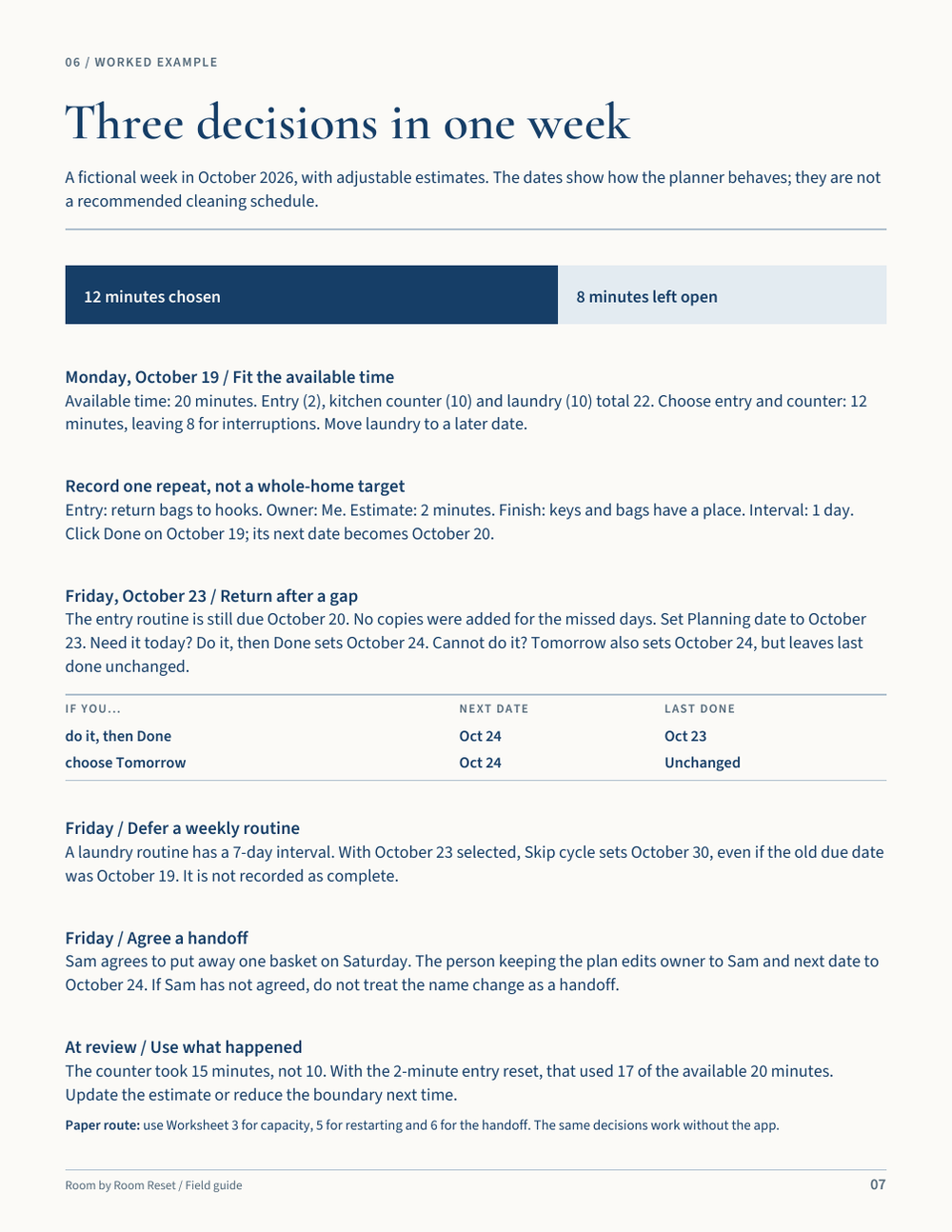
The worked week begins with 20 minutes available and 22 minutes of planned tasks. Choosing the entry and counter uses 12 minutes and leaves 8 open.
By Friday, the entry routine is still overdue. You can do it or move it. The next date may match, but the record of completion should not.
With October 23 selected and a one-day interval, Done sets the next date to October 24 and records October 23 as last done.
The next date becomes October 24. The previous last-done value stays unchanged.
How you use it
Use the guide and home map to decide where to begin.
Write a finish and an owner. Use a 2-, 10- or 20-minute option if it fits, or adjust the estimate.
Mark work done when it is complete. Move a date when it needs to wait; those are different decisions.
The download
The two paper sizes contain the same material. Pick the size that matches your paper.
Worked examples for zones, available time, repeat intervals, shared ownership and returning after missed days.
Home map, zone routine, weekly capacity, daily reset, restart, handoff, supplies, monthly review, project parking and observation grid.
Guide and worksheets in both sizes. Worksheet fields and checkboxes work in PDF readers that support interactive forms.
Add routines, filter by zone, owner and time per action, change next dates, and export or import a JSON backup.
Start-here instructions and a household-use license are included. The planner, PDF fields and paper sheets do not sync with each other.
Look inside
See a worked week and the restart worksheet from the included PDFs. Time estimates are examples, not a promise to clean a room in a set time.
Tap or click to enlarge
Tap or click to enlarge
Paper when it helps
A clear chair. Keys and bags in their places. One basket put away. Define the boundary before adding more tasks.
Name the zone and agree who owns the routine.
Describe a finish you can see, rather than “sort out the whole room.”
Shrink, move, skip a cycle or remove a routine. Set one realistic next date.
The digital option
No account, server or subscription is needed. The planner is an HTML file you open in a compatible browser.
Local browser saving is used when available. Export JSON after meaningful changes; browser cleanup, private browsing or moving the file can affect saved data.
Import replaces the current plan after confirmation. It does not merge or sync changes from other devices.
Owner names are labels, not invitations. Discuss handoffs and choose one person or shared paper sheet to keep current.
Also included
Choose US Letter or A4 for the guide and ten worksheet designs. The optional offline planner helps organize routines and dates. The two paper sizes contain the same material; your paper, PDF and planner copies do not sync.
Flaregale Home
A practical guide, ten worksheet designs and an optional planner. Begin with one useful zone.
Questions? Read the FAQ
Seller and contact details
One-time purchase · Personal household use
Full refund available within 14 days, including after download.
Flaregale / Home
Need help locating or opening your purchase? Email support@flaregale.com with your order details.
14-day refund policy
If the files are not right for you, request a full refund within 14 days of purchase—even after downloading. Email support@flaregale.com with your order details.
Your download link is available for at least 90 days. Save your files so you can continue using your copy under the personal-use license.
This policy does not limit your rights under applicable law. Read the purchase terms.
Before you buy
A PDF reader or printer for the documents. The optional planner needs a full browser that runs local HTML and JavaScript. Some phone file previews do not run those controls; use a compatible browser or the PDFs. PDF form support varies by reader.
No. You choose and adjust the routines. Follow the instructions for the products and appliances you use. The kit does not provide chemical, medical, repair or safety-critical maintenance guidance.
No extra missed occurrences are added. Edit one routine to move its date. Reset overdue dates moves all earlier next dates to the planning date, including routines hidden by filters; it does not mark anything complete.
No. There are no push notifications, shared accounts or live family synchronization. Keep one agreed copy and arrange handoffs through your usual household communication.
After purchase, use the delivery link to save your files. The link is available for at least 90 days from purchase; keep a local backup. You may print and keep copies for personal use by your household. You may continue using your downloaded copy under that personal license. Resale, redistribution and client use are not included.
You can request a full refund within 14 days of purchase, even after downloading. Email support@flaregale.com with your order details. This policy does not limit your rights under applicable law.
Your next step
Start with one zone, set a realistic boundary and leave room for the rest of the day.
Get Room by Room ResetUS$19
One-time purchase · Digital files only · 14-day refunds, including after download